
Cybercriminals have tried to imitate these SSO popups using HTML, CSS, and JavaScript, but the fakes usually look slightly “off,” making them easier to spot.
Introducing Browser-in-the-Browser (BitB) Attacks
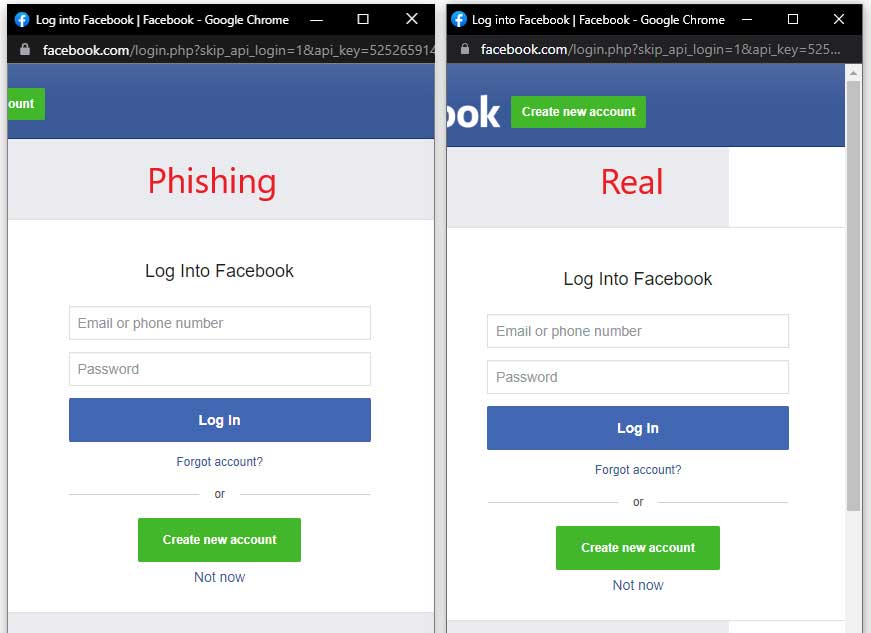
The new Browser-in-the-Browser (BitB) attack changes the game. It uses prebuilt templates to generate fake Chrome windows inside a real browser window. These templates include realistic address bars, window frames, titles, and even light/dark mode variations. The templates were created by security researcher mr.d0x, who published them on GitHub.
Using these templates, red teamers or attackers can:
- Download the template
- Edit the URL and window title
- Embed a real login form inside an iframe
- Present a popup that looks exactly like a legitimate Chrome SSO window
Attackers can also embed their own HTML login forms directly into the template, though that requires more alignment work.
Security researcher Kuba Gretzky, creator of the Evilginx phishing toolkit, tested the BitB method and confirmed it works seamlessly with Evilginx — meaning attackers could potentially steal not just passwords, but also two-factor authentication (2FA) tokens.
BitB attacks aren’t entirely new. Zscaler reported similar techniques being used in 2020 to steal Steam credentials. However, the availability of polished, ready-to-use templates now makes it far easier for attackers — and red teamers — to deploy convincing phishing windows.
What This Means (Plain‑Language Explanation)
This toolkit makes phishing attacks much more believable. Instead of sending victims to a suspicious-looking fake website, attackers can now display a perfectly realistic Chrome login popup inside the victim’s actual browser.
To the average user, it looks exactly like the real Google or Microsoft login window they see every day.
This dramatically increases the chances that someone will:
- Trust the window
- Enter their credentials
- Accidentally hand over passwords and 2FA tokens
In short: the line between real and fake login windows just got much harder to see.
Now What? (Practical Next Steps)
Here’s how individuals and organizations can respond:
- Educate users: Make sure employees know that SSO popups can be faked. Awareness is the first line of defense.
- Promote password managers: Password managers won’t autofill credentials into fake domains, even if the window looks real.
- Use hardware-based 2FA (FIDO2 keys): These keys verify the real domain before authenticating, making BitB attacks far less effective.
- Encourage hovering and checking: If a login window appears unexpectedly, users should verify the action they triggered.
- Run internal phishing simulations: Red teamers can use BitB templates to test how well employees detect modern phishing techniques.
𝗛𝗼𝘄 𝗚𝗿𝗲𝗲𝗻 𝗠𝗼𝗻𝗸𝗲𝘆𝘀 𝗦𝘁𝘂𝗱𝗶𝗼 𝗛𝗲𝗹𝗽𝘀
A safer digital experience isn’t just about avoiding phishing attacks — it’s about building systems, websites, and workflows that protect your business and your customers. At Green Monkeys Studio, we help small and medium‑sized businesses strengthen their online presence with secure, modern, and user‑friendly solutions.
Your website should work for you, not against you. Whether you need stronger authentication flows, better UX, improved security practices, or a full redesign, Green Monkeys Studio brings together design, technology, and cybersecurity awareness to support your growth.
Call Green Monkeys Studio at (206) 551‑6177 or book a free consultation at https://greenmonkeysstudio.com/book-a-consultation
Let’s build a website — and a security posture — that keeps your business protected and your users confident.